Follow these steps to create Login Page in Oracle ADF with ADF Security

- Create Login.jspx page with two input text fields and bind those fields to a bean. Bind the button to one of the functions available in the below code (doLogin or doLoginNew)
- Now add the following functions in the bean. You can either use doLoginNew or
doLogin function.
package view;

import java.io.IOException;

import javax.faces.application.FacesMessage;
import javax.faces.context.ExternalContext;
import javax.faces.context.FacesContext;
import javax.faces.event.ActionEvent;

import javax.security.auth.Subject;
import javax.security.auth.callback.CallbackHandler;
import javax.security.auth.login.FailedLoginException;
import javax.security.auth.login.LoginException;

import javax.servlet.RequestDispatcher;
import javax.servlet.ServletException;
import javax.servlet.http.HttpServletRequest;
import javax.servlet.http.HttpServletResponse;

import oracle.adf.view.rich.component.rich.input.RichInputText;

import weblogic.security.URLCallbackHandler;
import weblogic.security.services.Authentication;

import weblogic.servlet.security.ServletAuthentication;

public class LoginBean {
    private RichInputText _username;
    private RichInputText _password;

    public LoginBean() {
    }

    public void set_username(RichInputText _username) {
        this._username = _username;
    }

    public RichInputText get_username() {
        return _username;
    }

    public void set_password(RichInputText _password) {
        this._password = _password;
    }

    public RichInputText get_password() {
        return _password;
    }

    private static final String REDIRECT_LOGIN_URL = "/adfAuthentication?success_url=/faces/EmployeesPage";


    private void reportUnexpectedLoginError(String errType, Exception e){
      FacesMessage msg =
        new FacesMessage(FacesMessage.SEVERITY_ERROR, "Unexpected error during login",
                         "Unexpected error during login (" + errType + "), please consult logs for detail");

      FacesContext.getCurrentInstance().addMessage(null, msg);
      FacesContext.getCurrentInstance().renderResponse();
    }

    private void sendForward(String forwardUrl) {
        FacesContext ctx = FacesContext.getCurrentInstance();
        try {
          ctx.getExternalContext().redirect(forwardUrl);
        } catch (IOException ie) {
          reportUnexpectedLoginError("IOException", ie);
        }
         ctx.responseComplete();
      }

    public void doLoginNew(ActionEvent actionEvent) {

        String un = (String)get_username().getValue();
        byte[] pw = ((String)get_password().getValue()).getBytes();;
          FacesContext ctx = FacesContext.getCurrentInstance();
          HttpServletRequest request =
                         (HttpServletRequest)ctx.getExternalContext().getRequest();
          try {
              CallbackHandler handler = new URLCallbackHandler(un, pw);
              Subject mySubj =
                         weblogic.security.services.Authentication.login(handler);
              weblogic.servlet.security.ServletAuthentication.runAs(mySubj, request);
              ServletAuthentication.generateNewSessionID(request);
              String loginUrl = "/faces/EmployeesPage";
              sendForward(loginUrl);
           } catch (FailedLoginException fle) {
              FacesMessage msg = new FacesMessage(FacesMessage.SEVERITY_ERROR,
                                                "Incorrect Username or Password",
                                                "An incorrect Username or Password" +
                                                " was specified");
              ctx.addMessage(null, msg);
              set_password(null);
           } catch (LoginException le) {
              reportUnexpectedLoginError("LoginException", le);
           }

    }

    public void doLogin(ActionEvent actionEvent) {
        String username = (String)get_username().getValue();
        byte[] password = ((String)get_password().getValue()).getBytes();
        CallbackHandler handler = new URLCallbackHandler(username, password);
        try {
            Subject subject = Authentication.login(handler);
            ExternalContext eCtx = FacesContext.getCurrentInstance().getExternalContext();

            HttpServletRequest request = (HttpServletRequest)eCtx.getRequest();

            ServletAuthentication.runAs(subject, request);
            ServletAuthentication.generateNewSessionID(request);

            FacesContext ctx = FacesContext.getCurrentInstance();
            RequestDispatcher dispatcher = request.getRequestDispatcher(REDIRECT_LOGIN_URL);
            dispatcher.forward(request, (HttpServletResponse)eCtx.getResponse());
            ctx.responseComplete();
        } catch (LoginException le) {
            le.printStackTrace();
        } catch (ServletException se) {
            se.printStackTrace();
        } catch (IOException ioe) {
            ioe.printStackTrace();
        }
    }
}
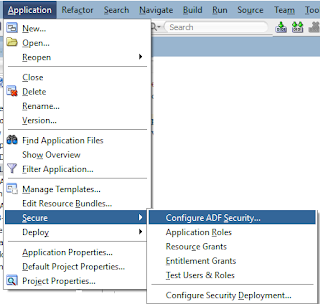
- Go to Application Menu -> Secure -> Configure ADF Security

- So now all users in Jazn-data.xml will be authenticated
Comments
Post a Comment