
To import AP Invoices using FBDI process in Oracle Fusion follow the below steps:
- In google search engine search for "oracle fusion fbdi 22d", as our version is 22d and open the first link (https://docs.oracle.com/en/cloud/saas/financials/22d/oefbf/index.html)

- In left pane go to Payables section and select
- Payables Standard Invoice Import and then download the XLSM Template

- When you open the XLSM file, if you get the below error :


- When you open the XLSM file, it already has the data in it. You can clear all the sheets and start inserting your own data
- Populate the below fields in AP_INVOICES_INTERFACE sheet. You can hover on each field to read the description of the field. All the Fields Start with '*" icon are mandatory Columns which we need to enter in the sheet.
Invoice ID: Any unique number like 1101
Business Unit: BU Name. To know the value for this go to
Setup and Maintenance -> Organization Structures -> Manage Business Unit
And then copy the Name of BU.

You can also run the below SQL and select Name column
SELECT organization_id,
name
FROM hr_operating_units
Source: Select the value for Invoice Source (like "Manual Invoice Entry"). To know the value for this go to
Setup and Maintenance -> Payables -> Manage Payables Lookups
And then copy Lookup Code for Lookup Type = "SOURCE".
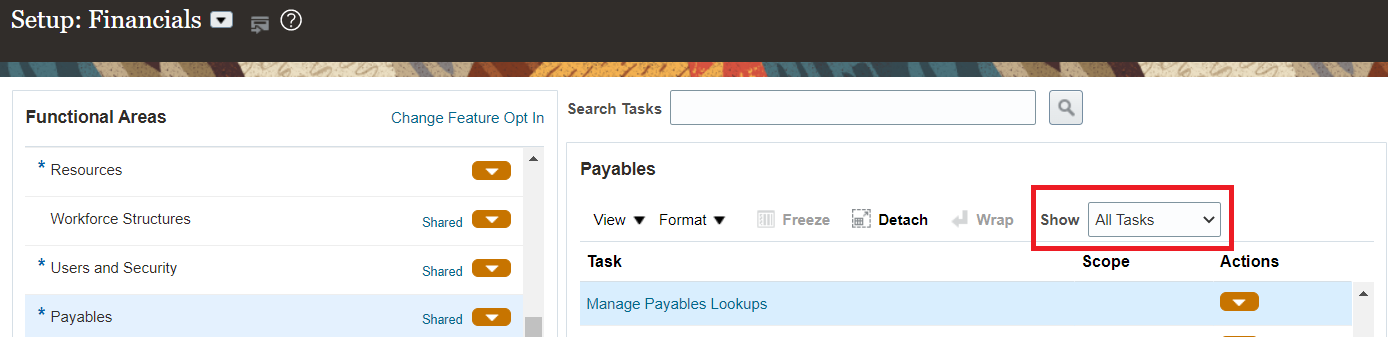

You can also run the below SQL and select Lookup_Code column
SELECT lookup_code,
meaning,
description
FROM fnd_lookup_values_vl
WHERE lookup_type = 'SOURCE'
AND view_application_id = 200
meaning,
description
FROM fnd_lookup_values_vl
WHERE lookup_type = 'SOURCE'
AND view_application_id = 200
Invoice Number: Any unique number like INV_1101
Invoice Amount: Any amount like 100
Invoice Date: Like 2023/02/15 (YYYY/MM/DD)
Supplier Name or Supplier Number: Any Supplier Name. To know the value for this go to
Navigator -> Procurement-> Suppliers -> Tasks -> Manage Supplier. Select Advanced and search for supplier. Copy the supplier field if that supplier exists.

You can also run the below SQL and select vendor_name or segment1 column
SELECT vendor_id,
vendor_name,
vendor_name,
segment1,
vendor_type_lookup_code
FROM poz_suppliers_v
vendor_type_lookup_code
FROM poz_suppliers_v
Supplier Site: Any Supplier Site. Run the below query and select the vendor_site_code
SELECT a.vendor_id,
b.vendor_site_id,
a.vendor_name,
a.segment1,
b.vendor_site_code,
a.vendor_type_lookup_code
FROM poz_suppliers_v a,
poz_supplier_sites_all_m b
WHERE a.vendor_id = b.vendor_id
b.vendor_site_id,
a.vendor_name,
a.segment1,
b.vendor_site_code,
a.vendor_type_lookup_code
FROM poz_suppliers_v a,
poz_supplier_sites_all_m b
WHERE a.vendor_id = b.vendor_id
Invoice Currency: Currency of the invoice like GBP. If you do not enter a value, then the supplier site currency code will default during invoice import.
Payment Currency: Currency of the Payment like GBP. If you do not enter a value, then the supplier site currency code will default during invoice import.
Description: Any description for the Invoice
Invoice Set: Group ID for the Invoice. Import set can be used to limit the import to invoices with a particular set. You can import data for the same source by specifying a unique import set for each request. This reduces the processing time of your import. Payables Open Interface Import imports data with the source and Import Set combination you specify.
Invoice Type: The type of invoice being imported, such as standard invoice, credit memo or prepayment. Valid values are STANDARD, CREDIT and PREPAYMENT.
Payment Terms: Any valid payment term. Payment terms used to create installments and to calculate due dates, discount dates, and discount amounts for each invoice. To know the value for this go to:
Setup and Maintenance -> Payables -> Manage Payment Terms
And then copy the Name= "Immediate".

SELECT name,
description
FROM ap_terms
WHERE enabled_flag = 'Y';
Accounting Date: GL_DATE which should be in the open period.
Import Set: GROUP_ID which can be used to limit the import to invoices with a particular set.
- Populate the below fields in AP_INVOICE_LINES_INTERFACE sheet. You can hover on each field to read the description of the field. All the Fields Start with '*" icon are mandatory Columns which we need to enter in the sheet.
Invoice ID: Same as in sheet AP_INVOICES_INTERFACE.
Line Number: Unique number for this Invoice Id record
Line Type: Type of invoice line. Valid values are ITEM, FREIGHT, TAX, and MISCELLANEOUS.
Amount: Invoice Line Amount
Description: Any description for invoice line
Once you filled all the mandatory fields, go to sheet "Instructions and CSV Generation" and click on Generate CSV File. This will generate the ZIP file containing CSV files for Invoice Headers and Lines
- Now Login to fusion application and go to Navigator -> Tools -> Scheduled Processes:

- Click on Schedule New Process button:
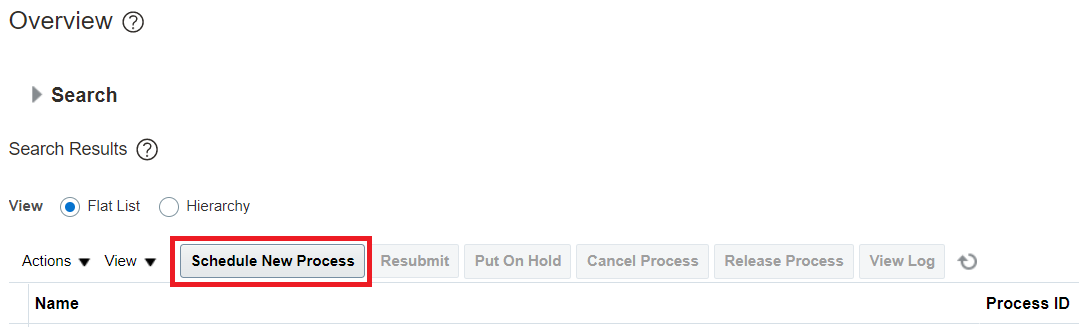
- Enter "Load Interface File for Import" in the name text box. This process will load the data in Interface tables which in our case is AP_INVOICES_INTERFACE and AP_INVOICE_LINES_INTERFACE

- Enter "Import Payables Invoices" in the Import Process and click on Upload a new file

- Click on submit


- Once this job completes, submit new process "Import Payables Invoices"


- Click on submit and wait for it to complete. Use the below queries to check data :
SELECT invoice_id
FROM ap_invoices_interface
WHERE group_id = 101;
SELECT *
FROM ap_invoice_lines_interface
WHERE invoice_id IN (SELECT invoice_id
FROM ap_invoices_interface
WHERE group_id = 101);
FROM ap_invoices_interface
WHERE group_id = 101;
SELECT *
FROM ap_invoice_lines_interface
WHERE invoice_id IN (SELECT invoice_id
FROM ap_invoices_interface
WHERE group_id = 101);
- Status should be 'PROCESSED' in ap_invoices_interface
Comments
Post a Comment