
This post will show how to work with OAuth and multi-part APIs using OIC Integration.

First, Let's see how this looks in Postman. For this, I have created a collection "Multi Part API Demo" and have defined two variables:

- access_token - stores the Auth Token received from Auth API. Auth API will return Bearer Token which will be used by Email API to send the emails.
- hostname -stores the hostname of the API server like https://www.test.com. This is our Base URL for APIs.
APIs involved:
- Auth API - {{hostname}}/oauth2/token A this will return Authentication Token which will be used by Email Send API. This API is using OAuth in which we will be passing the Client Id in username and Client Secret in Password for Authorisation

pm.test("Set Token", function () {
    var jsonData = pm.response.json()
    console.log(jsonData.access_token)
    pm.collectionVariables.set("access_token",jsonData.access_token)
});

- Email API - {{hostname}}/email/send This is MultiPart API which sends an email and takes multi-part payload

- Define Connection TEST_REST_CONN

Here we have kept the Security Policy as No Security and we can pass the OAuth Credentials in the Header Authorization tag.

Authorization tag will have value as "Basic auth_token" where auth_token will be the base64encode of "client_id:client_secret"
For Example, if client_id is xyz and client_secret is welcome1, then base64encode of "client_id:client_secret" will be eHl6OndlbGNvbWUx and Authorization tag will be "Basic eHl6OndlbGNvbWUx"

- Now with the same connection add another REST Action in the integration, Make sure you select "Configure Request Headers" as we will use this to send multi-part payload i.e. form-data of API Request Body

- Also, select both the below options:

- Define Custom HTTP Headers as below if required


- Add below mappings for Attachments:

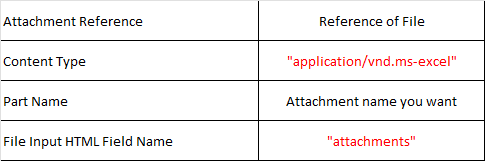
- Similarly, add mappings for Standard & Custom Headers

- Now use Parameter List to construct Multi-Part Payload i.e. form-data of the request body:

Here, we have defined 6 parameters. There are two components of each parameter:
- Parameter Value - Maps directly to the Parameter element
- Parameter Name - Maps to name element

The Mapper code will be like:

Comments
Post a Comment