Make sure you have setup your jDeveloper properly and created OAWorkspace. In case you have not done that before, click here to see how.
Click here to know different types of search pages in OAF.
Below are the steps in brief:
- Create Application Module (AM)
- Create View Object (VO)
- Add VO to AM
- Create a page
- Add Query Region to the page
- Make search allowed true for the fields to be displayed in search criteria
We will add new package (rbsearch as subcomponent of component demo) in our previous application workspace.
- Right click demo package and click New

- In Business Tier category, select ADF Business Components -> Application Module

- Click Next button

- Enter the package oracle.apps.cie.demo.rbsearch.server and Name as RbSearchAM (AM suffix to identify that its an AM)

- Click Next button

- Click Next button

- Click Next button

- Click Finish button

- RbSearchAM will be created and displayed in the Applications Navigator. In structure, you can see the associated files like RbSearchAM.xml, RbSearchAMImpl.java, and bc4j.xcfg


- bc4j.xcfg is a configuration file which holds the connection definition details

- RbSearchAM.xml is code file of application module

- RbSearchAMImpl.java is the java class associated with the AM. In this we can write java methods which can be invoked from the controller java class.

- Oracle ships a file named server.xml with each bc4j package. You will need to ftp that file alongside other bc4j objects(VO’s, EO’s, AM, Classes etc). Opening the server.xml will load the complete package starting from AM(application module). This is a mandatory step when building Extensions to framework.

- Right click the server package and select New View Object

- Click Next button

- Enter the Name as RbSearchVO and select Read-only Access radio button

- Paste the below query in this screen

SELECT
ooha.header_id,
ooha.order_number,
ooha.cust_po_number,
ooha.ordered_date,
ooha.org_id,
hou.name org_name
FROM
oe_order_headers_all ooha,
hr_operating_units hou
WHERE
ooha.org_id = hou.organization_id
- Click Next button

- Click Next button

- Click Next button

- Click Next button

- Click Next button
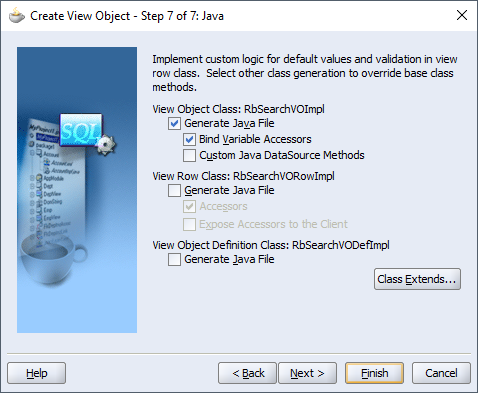
- Click Finish button

- RbSearchVO will be displayed in the navigator


- Double click the RbSearchAM and add the RbSearchVO.

- Give the instance name as RbSearchVO and click OK button

- Now right click rbsearch package in navigator and click New and select Page

- Give Name and Package
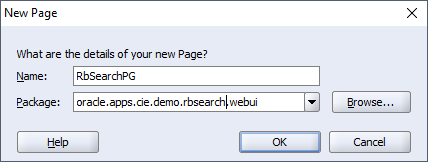


- Change the below properties of pageLayout region (region1)


- Right click PageLayoutRN and select New -> Region

- Change the below properties then

- Right click QueryRN and select New -> Region Using Wizard

- Click Next button

- Select the RbSearchVO and click Next button

- Set Region ID as SearchTable and select Region Style as table and click Next button

- Select all the attributes and click Next button

- Set style of each field to messageStyledText (readonly text field) and click Next button

- Click Finish

- Set Search Allowed true for OrderNumber and OrgName


- Save all the changes. Right click the page file and select Run

- Page will be displayed

Comments
Post a Comment